

The thread
Why a LangGraph agent forgets between threads
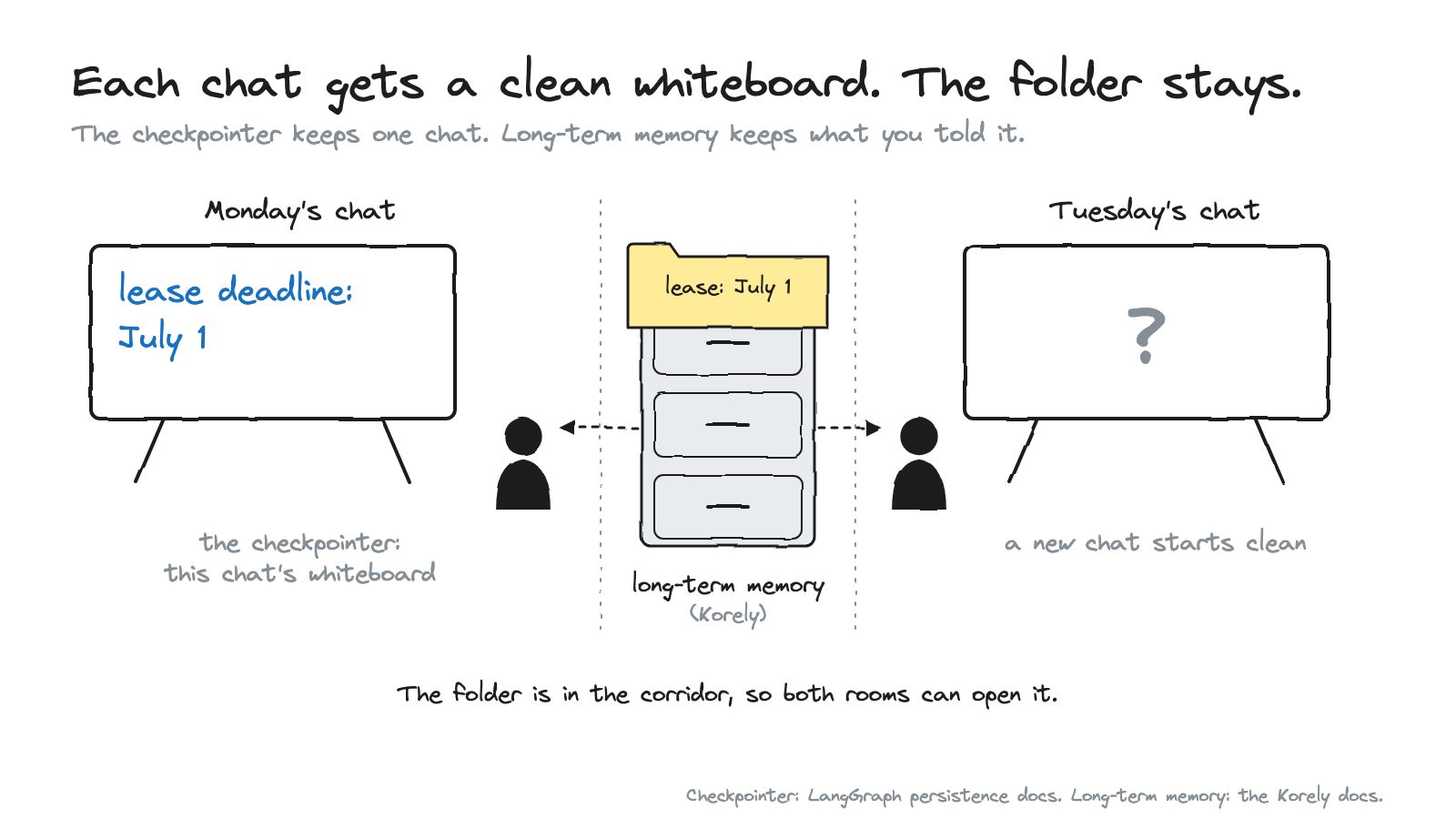
Tuesday morning. You open a new chat with your agent and ask what you decided about the lease on the flat in Barcelona. It doesn't know there is a lease. Yesterday you told it the renewal deadline is July 1.
Nothing is broken. Your agent is built with LangGraph, a library for building AI agents as a graph of steps, and Tuesday is a new thread. So you type the same sentence again, to the same program, a day later.
LangGraph's own docs draw the same line. Checkpointers "persist a thread's graph state as checkpoints", and they are for "short-term, thread-scoped memory". For what should last across threads the page points to a store, and adds: "a checkpointer tracks the current thread, and a store tracks durable information across threads" (LangGraph persistence docs, read on 26 November 2026).
So LangGraph already has a place for what should last: its Store, which holds preferences, facts and shared knowledge across threads. You can build long-term memory with it. Here is how the three pieces line up.
| Piece | Scope | What it is for |
|---|---|---|
| LangGraph checkpointer | One thread | The state of the graph: continuity, resuming, going back to an earlier step |
| LangGraph Store | Several threads | Data your application defines: preferences, facts, shared knowledge |
| Korely | Several threads, agents and frameworks | Memories, facts with the day they became true, and a shared context, through an API that doesn't depend on LangGraph |
You can keep your own long-term memory in a Store. A team may prefer Korely when the same memory should also serve agents built with other tools, or when it wants each fact to keep the day it became true and, after a change, the day it stopped, with a service that runs on Korely Cloud or on a server of your own. The rest of this piece shows how to connect it.
Korely
A memory that lasts across threads
Keep your checkpointer for the thread. Korely is the folder: a memory service your agent calls through Korely's Python library, the SDK.
Your code saves a memory, a piece of text. Korely keeps the text and, in the background, writes short facts out of it, like "the lease deadline is July 1". Each fact has the day it became true. When a newer fact replaces it, the old one gets an end date and stays readable. A model inside Korely makes that call, and every fact has its own id, so you can read it back and correct it.
Where does it run? On Korely Cloud, which we manage, with your data in Helsinki. Or you install the open source code with Docker on a server of your own, and the data stays there. The code below is the same for both. On your own server you point the SDK at its address and use the key that server makes. Setup for your own server is on Install Self-hosted.
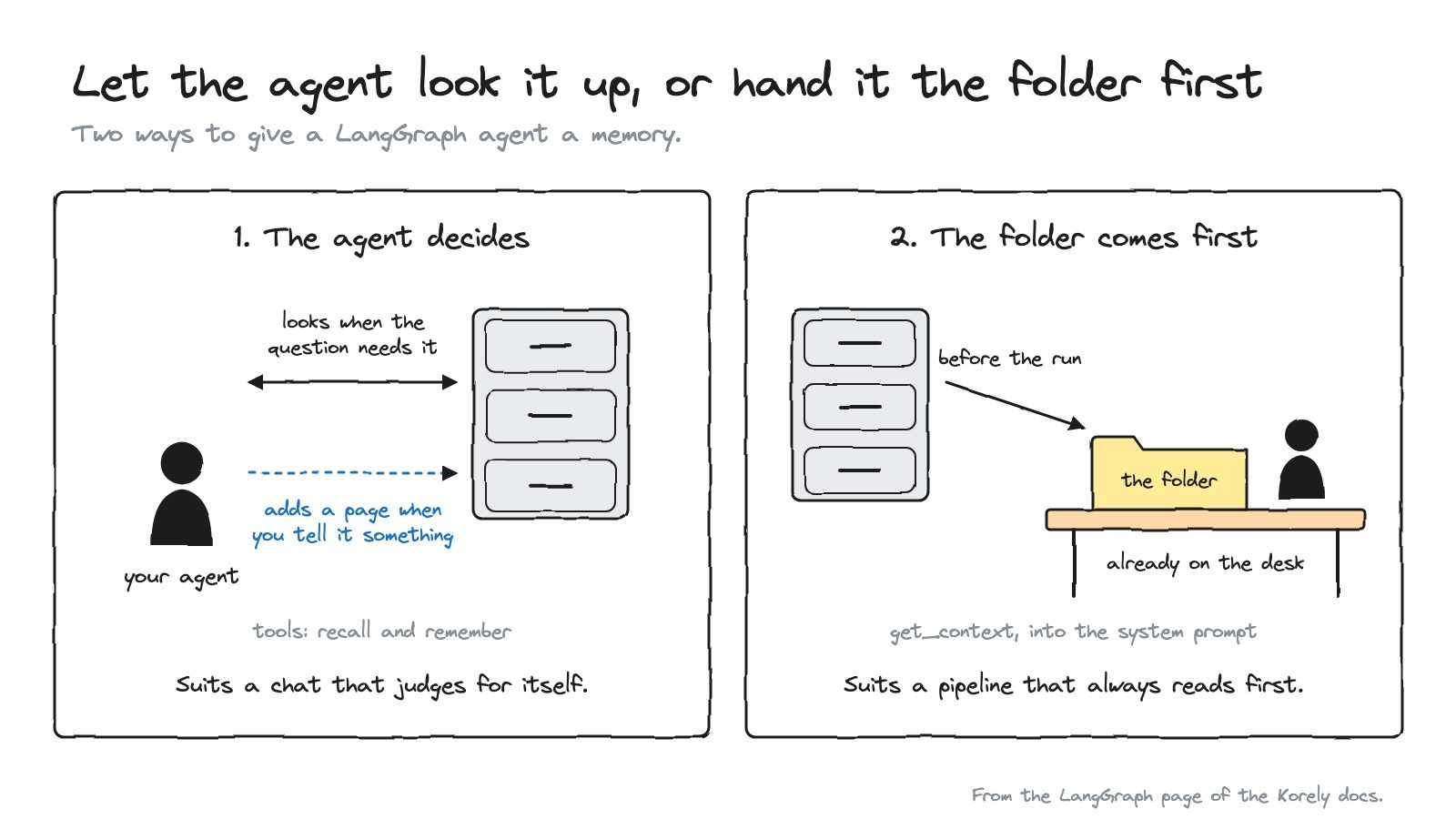
You can give a LangGraph agent this memory in two ways.
Pattern 1
Let the agent decide when to read its memory
You wrap two SDK calls as tools, recall and remember, and the agent
decides when to use them. This suits a chat agent that should judge for itself whether a
lookup is needed.
The string openai:gpt-6-luna in the code needs an OpenAI key. Any chat model that
supports tool calling works if you change it. Install the packages and export the keys:
pip install korely-memory langgraph "langchain[openai]"export KORELY_API_KEY="kor_live_..."export OPENAI_API_KEY="sk-..."A new account has no memories, so save one for the agent to find, once:
from korely_memory import KorelyKorely().add( "Lease renewal call with Anna: the deadline is July 1. She confirmed a " "3% increase, from 1,200 to 1,236 EUR per month starting in August.", user_id="me",)
The memory is about one person, you, so it carries a user_id. Use the same one in
every call below. Korely asks every write to say whose memory it is: the person it's about
(user_id), the agent writing it (agent_id), or both. A write that
names neither gets a 422 identity_required, and nothing is saved.
Then the agent. It starts from the LangGraph page of the Korely docs, where recall uses search; here recall reads through get_context. Here
agent_id is a label for the agent that writes the memory:
import asynciofrom langchain.agents import create_agentfrom langchain_core.tools import toolfrom korely_memory import Korely
korely = Korely()  # reads KORELY_API_KEY from the environmentUSER_ID = "me"  # the person the memories are about
@tooldef recall(query: str) -> str:    """What the memory knows about this user, as of now."""    context = korely.get_context(query, user_id=USER_ID, token_budget=800)    return context.context or "No memories yet."
@tooldef remember(content: str) -> str:    """Save a durable fact to memory."""    m = korely.add(content, agent_id="assistant", user_id=USER_ID)    return "Saved as " + m.id
agent = create_agent(    model="openai:gpt-6-luna",    tools=[recall, remember],    system_prompt=(        "You are an assistant with persistent memory. "        "Call recall before answering questions about the user's past. "        "Call remember when the user tells you something durable."    ),)
async def main() -> None:    result = await agent.ainvoke(        {            "messages": [                {                    "role": "user",                    "content": "What did I decide about the lease renewal?",                }            ]        }    )    print(result["messages"][-1].content)
asyncio.run(main())
Run python agent.py. When the model calls recall,
recall calls korely.get_context for this user, and back comes your
own sentence from Monday, July 1 and all. The answer around it is your model's, in its own
words. The memory is found right away; the facts written from it take about ten seconds.
Why get_context and not search? search returns the saved memories that match, so after a change it can return the old
sentence as well as the new one. get_context puts together what holds now (the
facts) and the memories that match. Use search when the model needs the original wording (pass full_text=True for the whole text). This example leaves the checkpointer out to stay short: it is about the
long-term memory, and your graph keeps its checkpointer as before.
Keep the rule in the system prompt. The agent only knows what you give it, and the line "call recall before answering" is what makes it look in memory. Without it, the model sometimes answers from its own training.
Pattern 2
Put the memory in the prompt before the run
In the second way you call get_context before the run and put what it returns
into the system prompt. It's a ready-made block, the context block,
with the facts that are true now and the memories that match the question best. The agent
never has to decide whether to look, which suits a fixed pipeline.
from langchain.agents import create_agentfrom korely_memory import Korely
korely = Korely()context = korely.get_context(    "What did I decide about the lease renewal?",    user_id="me",    token_budget=800,)agent = create_agent(    model="openai:gpt-6-luna",    tools=[],    system_prompt="You are an assistant with memory.\n\n" + context.context,)result = agent.invoke(    {"messages": [{"role": "user", "content": "When is the renewal deadline?"}]})print(result["messages"][-1].content)
token_budget is the size of the block. Here we ask for 800 tokens, about a page
of text, and you can ask for more.
Korely runs no language model to build it. Your agent's model does the reasoning.
Many people
One memory per person
Everything above keeps the memory of one person, the fixed USER_ID. That's right
for a personal assistant. A product that serves many people gives each person their own
memory: pass a user_id on every write and every read. Build the agent per request
and put the user_id inside the tools, so the model never sees it and can't change
it. A read without a user_id covers every end user of the project. Fine inside an
internal tool. Wrong inside a customer chat.
The LangGraph page of the docs has a build_agent_for(user_id) you can copy. Its recall uses search: swap in the get_context line from above to get the facts too.
To take home
What to keep from this
Keep the checkpointer for the conversation, and give the agent a memory that lives outside it. If the agent should judge for itself, give it tools; if it should always read first, hand it the context block.
Tuesday, new thread, same question. This time the agent opens the folder first, and July 1 is in it. You don't type the sentence a second time.
Make a key on the dashboard, as the Quickstart shows, and save the July 1 sentence as your first memory.
FAQ
Questions about Korely and LangGraph
Does Korely replace the LangGraph checkpointer or the LangGraph Store?
It does not replace the checkpointer: they sit side by side. The checkpointer keeps the state of one thread, so a conversation can carry on where it stopped. Korely keeps what the agent should know in every thread: the memories you save and the facts written from them, each with the day it became true. One graph can use both. The LangGraph Store is LangGraph's own place for data that lasts across threads. Korely is a separate service that any framework can call, so the same memory can serve agents that are not built with LangGraph.
How do I keep one customer's memory apart from another's?
Pass the same user_id on every write and every read for that person. A read with a user_id returns only that person's memories and facts. Build the agent per request and put the user_id inside the tools, so the model never sees it and can't change it.
Does Korely run a language model when the agent reads?
No. search, get_context and get_facts run no language model: your agent's own model does the reasoning. Korely uses a model after a write, to read the memory into facts and to decide whether a new fact replaces an old one.
Where is the data stored?
On Korely Cloud, which we run for you, your memories and facts are stored on our servers in Helsinki. Korely is also open source: you can install it with Docker on a server you control, and then the data stays there. The Data governance page of the docs has the details.