

The problem
A bot that quoted Anna the wrong plan
Korely is a memory your agent calls over an API: it saves what people tell it and reads it back later, on Korely Cloud or on your own server.
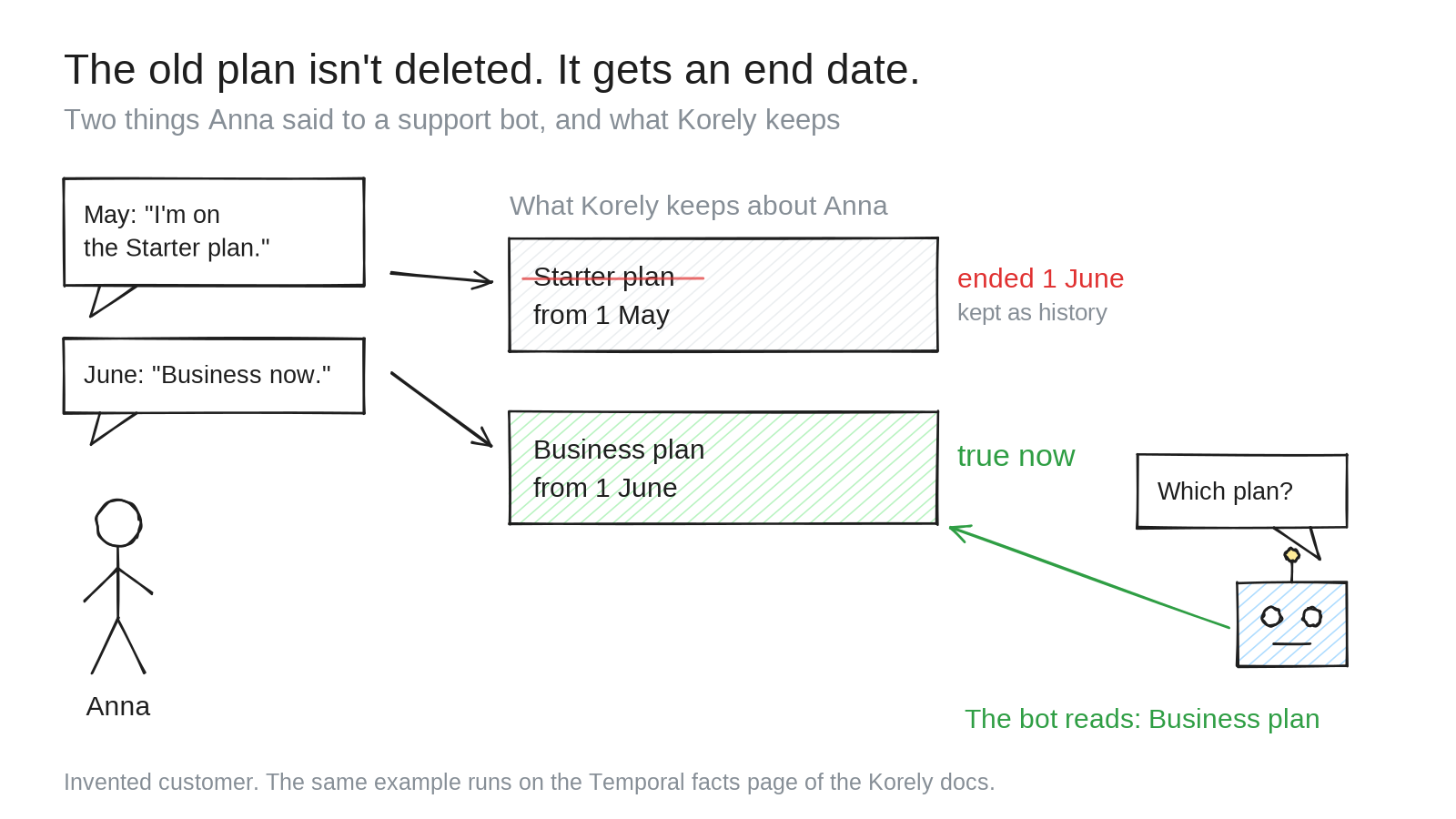
Say you're building a support bot for an online shop, and its first version keeps what customers say in a table of its own. In May a customer, Anna, tells it she's on the Starter plan. In June she moves to Business. In July she writes again, and the bot quotes her the Starter prices.
Nothing crashed. The table had both sentences, and nothing in it said which one still held. Anna noticed.
I'll use Anna from here on.
If you're still choosing a memory layer, Mem0 alternatives puts six side by side.
Dated facts
Facts that know when they changed
Your agent saves text, and Korely keeps two things. The text itself is a memory. Out of it, Korely reads short facts, each one thing about one person, such as Anna / is on / Business plan. Every fact carries two dates, when it became true and when it stopped.
When a new fact clashes with an old one, a model inside Korely reads the two side by side. The docs call it the judge. If the two can't both be true, the old fact gets an end date, and it stays in the memory.
Here are Anna's two plans, saved under customer-4812, the id your shop gives her
(more on ids below). In the code, "is on" is written subscribes_to. To show the dates, this
code writes the two facts directly, as the Temporal
facts page does. In normal use your agent calls add() with the sentence, and
Korely writes the facts itself.
from korely_memory import Korelykorely = Korely() # reads KORELY_API_KEY from the environmentkorely.add_fact_triple( "customer-4812", "subscribes_to", "Starter plan", user_id="customer-4812", valid_from="2026-05-01",)new = korely.add_fact_triple( "customer-4812", "subscribes_to", "Business plan", user_id="customer-4812", valid_from="2026-06-01",)print(new.invalidated)for f in korely.get_facts(user_id="customer-4812", include_invalidated=True): print(f.object, f.valid_from, f.invalid_at)It prints this (ids are longer):
['fct_ad36...']Business plan 2026-06-01T00:00:00+00:00 NoneStarter plan 2026-05-01T00:00:00+00:00 2026-06-01T00:00:00+00:00
The first line is the id of the Starter fact the new write closed. None means
no end date, so the Business plan is true now. The Starter plan ends on 1 June, the day Business began. A normal read, without
include_invalidated=True, gives back only Business, which is what your bot
should quote in July.
The old fact still answers questions about the past. If Anna asks which plan she paid for
on 15 May, a read with as_of asks what was true on that day:
for f in korely.get_facts(user_id="customer-4812", as_of="2026-05-15"): print(f.object, f.valid_from, f.invalid_at)# Starter plan 2026-05-01T00:00:00+00:00 2026-06-01T00:00:00+00:00The same goes for anything that changes in a life: a delivery address that moves from London to Berlin, or a phone number. A birthday doesn't change, so it just stays.
When you save the new state, say it the way you would today: "Anna is on the Business plan". Avoid "Anna moved from Starter to Business": it describes something already over, so Korely stores that fact closed from the start, and a normal read leaves it out (memory model).
Keeping people apart
Each person's memory stays theirs
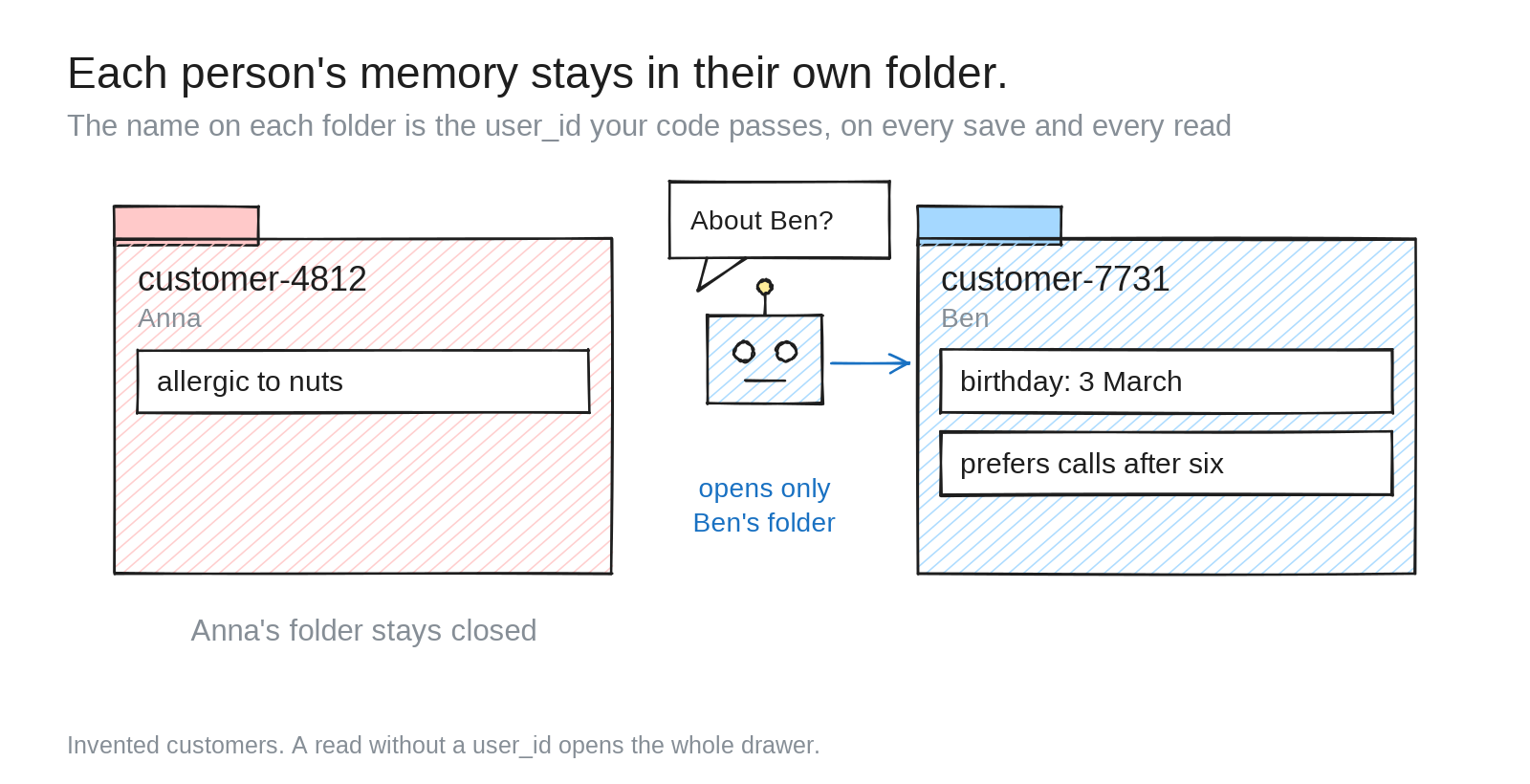
Every write says whose memory it is: a user_id for the person it's about, such
as customer-4812, an agent_id for the agent that writes it, such as
support-bot, or both. A read with a user_id returns only that
person's memories and facts. And an API key reads only its own project, the workspace it
was made in.
Your bot talks to Anna and to Ben. Anna is allergic to nuts. Ben's birthday is on 3 March, and he prefers calls after six. When the bot asks about Ben, it gets Ben's birthday and his evening calls. Anna's allergy stays with Anna.
One slip breaks this, so I'll say it before you write any code. A read without a
user_id covers every end user in the project. Pass it every time.
And pick an id that means nothing outside your system, such as customer-4812,
rather than an email address or a name. The id travels with the text to the model that reads
it, so an email address used as an id would go along too
(Quickstart, Terms).
Corrections and erasing
When a fact is wrong, or has to go
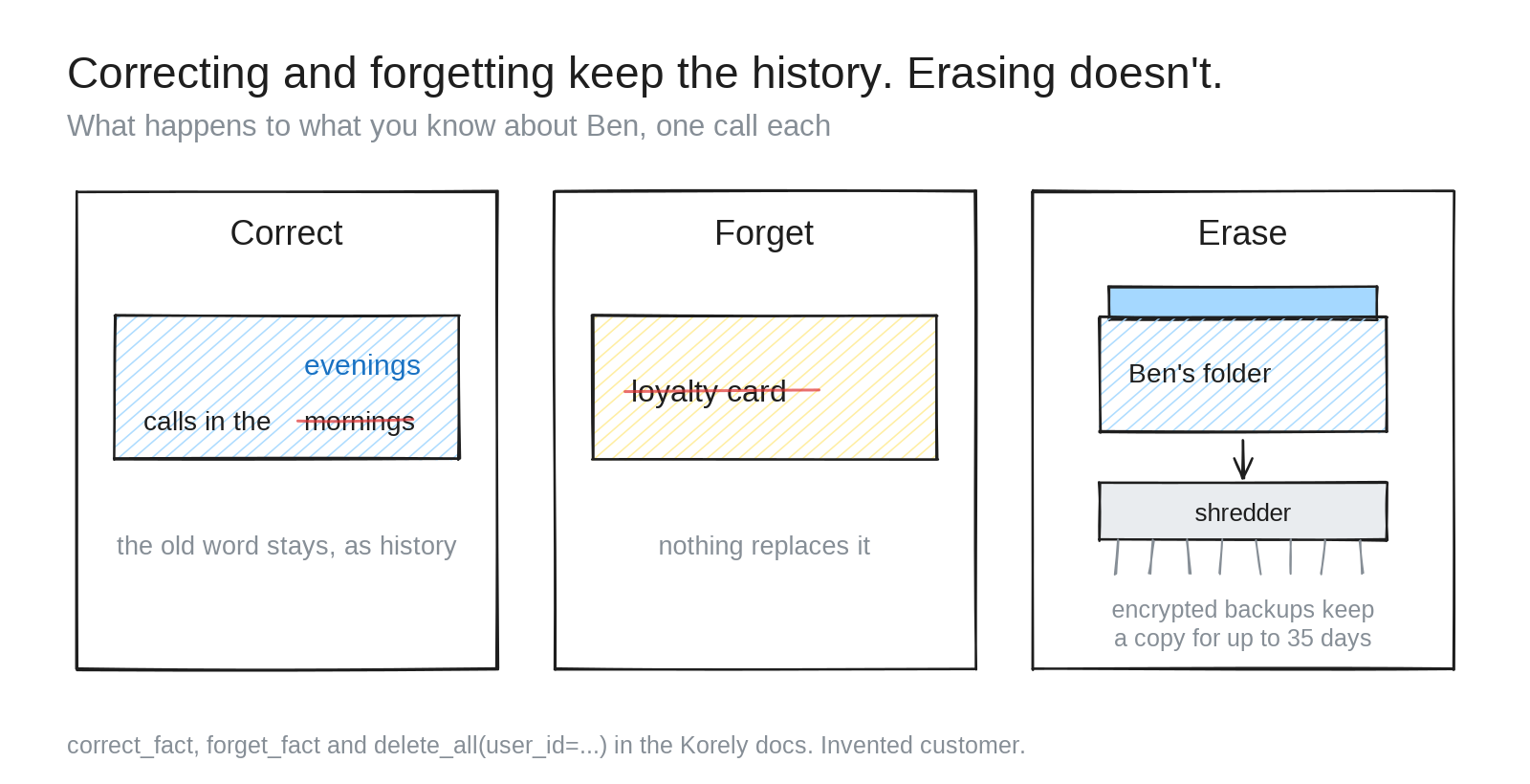
People change their minds, and agents mishear. Your code gets one call for each case:
- Correct a fact. The bot wrote that Ben prefers morning calls. He said
evenings.
correct_factwrites the right value, which counts from now on, and closes the wrong one as history. - Forget a fact. Ben cancels his loyalty card and nothing replaces it, so
forget_factcloses the fact and reads stop returning it. - Erase a person. When Ben asks you to delete what you hold about him,
delete_all(user_id=...)erases every memory and fact of that end user in your project. Encrypted backups keep a copy for up to 35 days.
Every fact has an id, so you can also put these moves in your users' hands: a "what do you remember about me" screen where Ben reads his facts and fixes or removes one. Human in the loop shows how.
Several agents
One memory for a team of agents
Products tend to grow more than one agent. One answers support questions, another handles billing. In Korely they can share one memory, as long as their keys belong to the same project.
Each agent writes with its own agent_id. A read with Anna's
user_id and no agent_id sees what all of them wrote about her. When
the billing agent saves Anna's new plan, the judge also weighs the plan the support agent
saved in May. It looks at Anna's facts that have no end date yet, whoever wrote them, and
picks the ones that could clash. If the two can't both be true, the old one is closed with a
date.
Watch agent_id on reads. Put it in and the read shrinks to what that one agent
wrote, so for the shared view, leave it out. user_id is the other way round:
leave it out and the read covers everyone in the project. The longer story, with code,
is in Shared agent memory.
Try Korely
Try it in a minute
You need Python 3.9 or later and a key. Create a free account at
agent.korely.ai/signup,
press Create my key on the dashboard's home page, and set the key as
KORELY_API_KEY, the environment variable the code below reads. A key made there
can read and write but can't manage projects or keys, or close the account, which is what
an agent should hold. Then pip install korely-memory and run this. It's
Ben from the folders above, under his own id:
from korely_memory import Korely
korely = Korely()  # reads KORELY_API_KEY from the environmentkorely.add(    "Ben prefers calls after six, and his birthday is on 3 March.",    user_id="customer-7731",)
# Later, even in a new session:ctx = korely.get_context(    query="when should I call Ben?",    user_id="customer-7731",)print(ctx.context)  # text you paste into your agent's prompt
The memory can be read as soon as the call returns. Its facts take about ten seconds to
appear, sometimes up to half a minute, because Korely reads them out of the text in the
background. Call get_context again then, and a Known facts part shows
up above the memory.
Then run Anna's test from the top, under a new id so the two facts written earlier don't mix in. Save that she's on the Starter plan and wait for its fact, about ten seconds. Then save that she's on the Business plan, wait again, and ask which plan she's on. That's the July conversation. The Quickstart walks through each call, in Python, Node or plain REST.
Conclusions
What I take home
- Anna's table had both of her sentences and still got July wrong, because neither one said whether it still held, or since when.
- Write the state as it is today, "Anna is on the Business plan", under an id that's hers alone.
In July Anna writes again and the bot reads Business. Create a free key and run her test.
FAQ
Questions before you try Korely
What happens to an old fact when a new one replaces it?
Korely gives it an end date and keeps it. A normal read returns only what is true now. With include_invalidated=True the old facts come back too, each with its dates, and with as_of you read what was true on a given day.
Can several agents share one memory?
Yes, when their keys belong to the same project. Each agent writes with its own agent_id. A read with the user_id and no agent_id returns what every agent wrote about that person.
Can I erase everything Korely knows about one person?
Yes, with one call: delete_all(user_id=...) erases every memory and fact of that end user in the project of your key. Encrypted backups keep a copy for up to 35 days.
Where is my data stored?
On Korely's server in Helsinki, on every Cloud plan. A model reads your text to write the facts, and you choose that model project by project. One of the choices keeps that reading in Europe too. The Data governance page in the documentation has the details.
Can I run Korely on my own machine?
Yes. The code is on GitHub under the Apache 2.0 license, and Korely Self-hosted installs it on your own machine with Docker.