

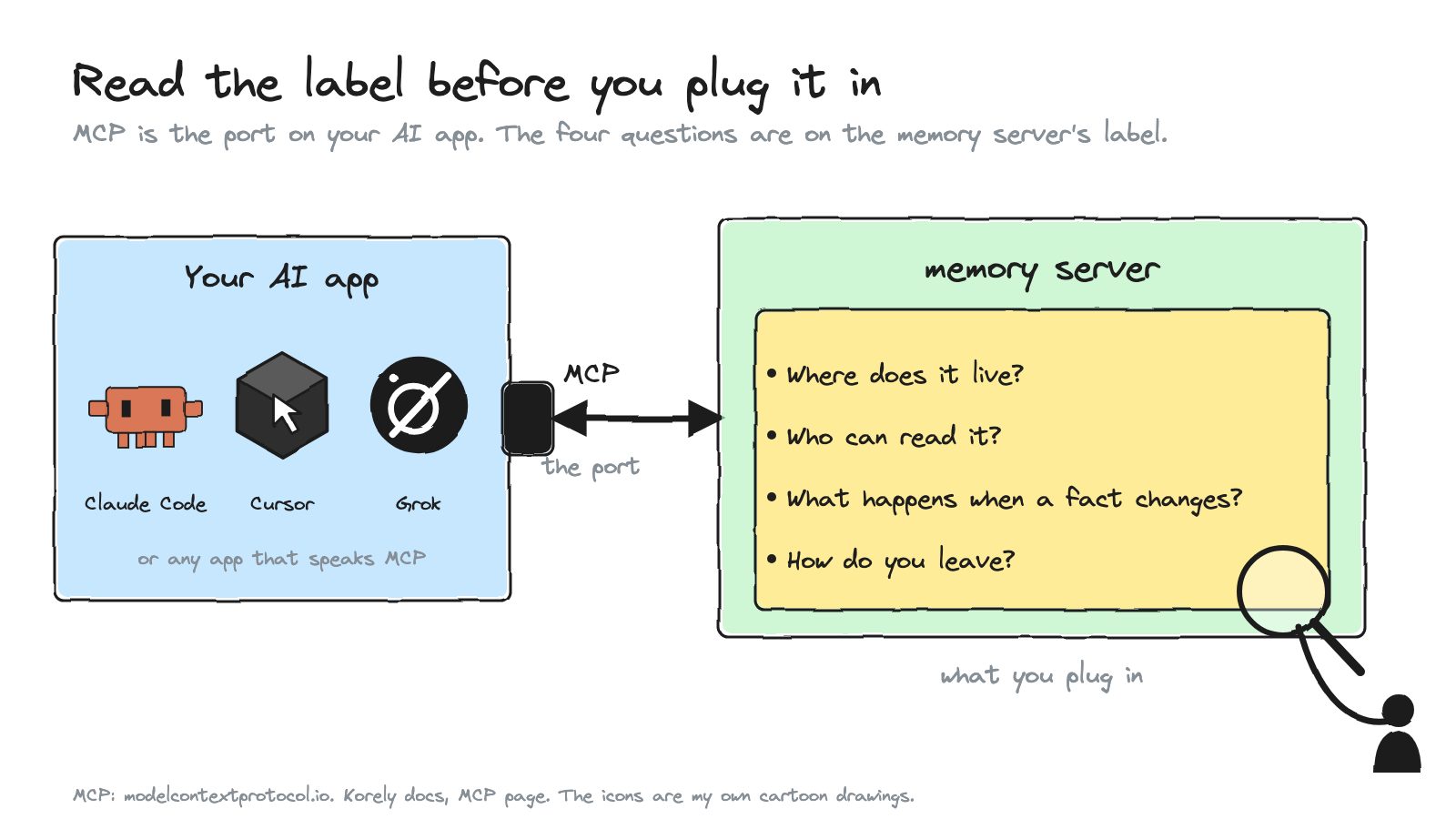
A memory MCP server gives your coding assistant a few tools. One saves what you decided, one reads it back in the next session, and a few more look things up or fix them. Before you connect one to Cursor or Claude Code, ask four things: who runs the server and where the data is kept, who can read it, what happens when a fact changes, and how you leave. They work for any memory server. I build Korely, a memory for AI agents, because I had agents in Claude Code, Hermes Agent and Grok and wanted one memory for all of them, so after each question I say how Korely answers it, and the steps to connect it come at the end.
The story
Why a decision needs its reason written down
I have a small program that reads public posts about AI memory every day and keeps the people worth talking to. One morning I scrolled through what it had thrown away and found the people I built it to find. I went looking for why it was so strict, and found, among other things, a line in its rules file: always discard opinions with no episode attached, no story of something that happened.
I'd asked for that line. I'd forgotten it was there.
Then I wanted the reason. All I had was six copies of the file, each saved next to it before a change, and not one of them said why the line was there.
A memory keeps a decision together with its reason and its date, in a place your assistant reads next time. For a coding assistant that's usually a memory server you plug into your editor through MCP.
The same site describes MCP as "an open-source standard for connecting AI applications to external systems" (modelcontextprotocol.io, read on 26 November 2026).
Question 1
Who runs the server, and where is the data kept?
A memory can live on your computer, on a server someone runs for you, or on a server you run yourself. The question is who manages that server, where the data is stored, and whether you can move the whole thing to infrastructure you control. A memory kept on one machine is simple, but another computer can't read it. A server, yours or someone else's, can be reached from several machines and several assistants.
Korely comes in two forms, and you choose. Korely Cloud is the one we run for you: managed infrastructure, the simplest setup, and one memory that several agents and devices can read. The Cloud stores your memory in Europe, on our server in Helsinki, on an encrypted disk. Data and governance has the details, including which AI model reads the text to write the facts.
Korely self-hosted is Korely's open-source code, on GitHub, installed on infrastructure you control. Rent a server (a VPS) from any provider you like and install Korely there, in Docker. Install Self-hosted has the steps. Then you control the server and the data, you choose the AI model that writes the facts, and several devices and agents can still share that one memory.
Question 2
Who can read your notes?
A memory holds decisions, names, sometimes things you'd rather not paste around. Ask who can see them, and whether one person's memory is visible to another. You want to hear what one key can touch: a good key opens one room, not the whole building.
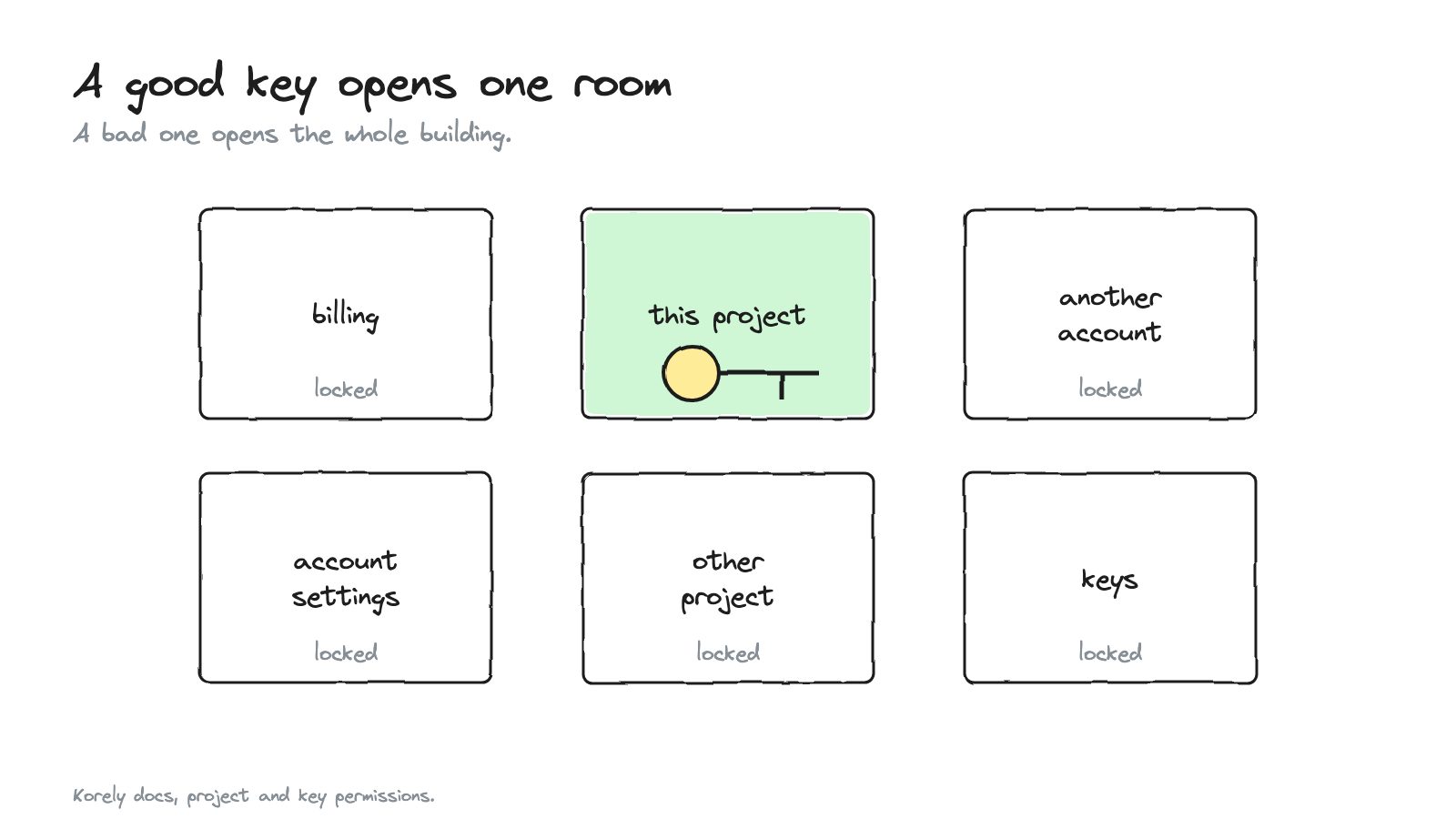
Korely: a key belongs to one project and reads and writes that project only. A read can also name one end user, the customer of your own app, and then it returns only that person's memories. If you later build a bot for your customers, that's what keeps each customer's notes apart.
The key you give your editor is made without admin, the permission that manages the whole account. It reads and writes memories and nothing else. Step 1 below shows where to make it. Make one key for each editor or machine, all in the same project, so you can revoke one without touching the others.
Question 3
What happens when a fact changes?
Say your project deploys to Render, a hosting company, and on Monday you move it to Hetzner, another one. Ask what the server does with the two lines: keep both side by side, keep only the new one, or keep the old one marked as old, with a date. And ask who decides, because someone has to.
My program's file kept only the new line. The old one went into a copy, and a copy can't tell you why a line was there, or since when.
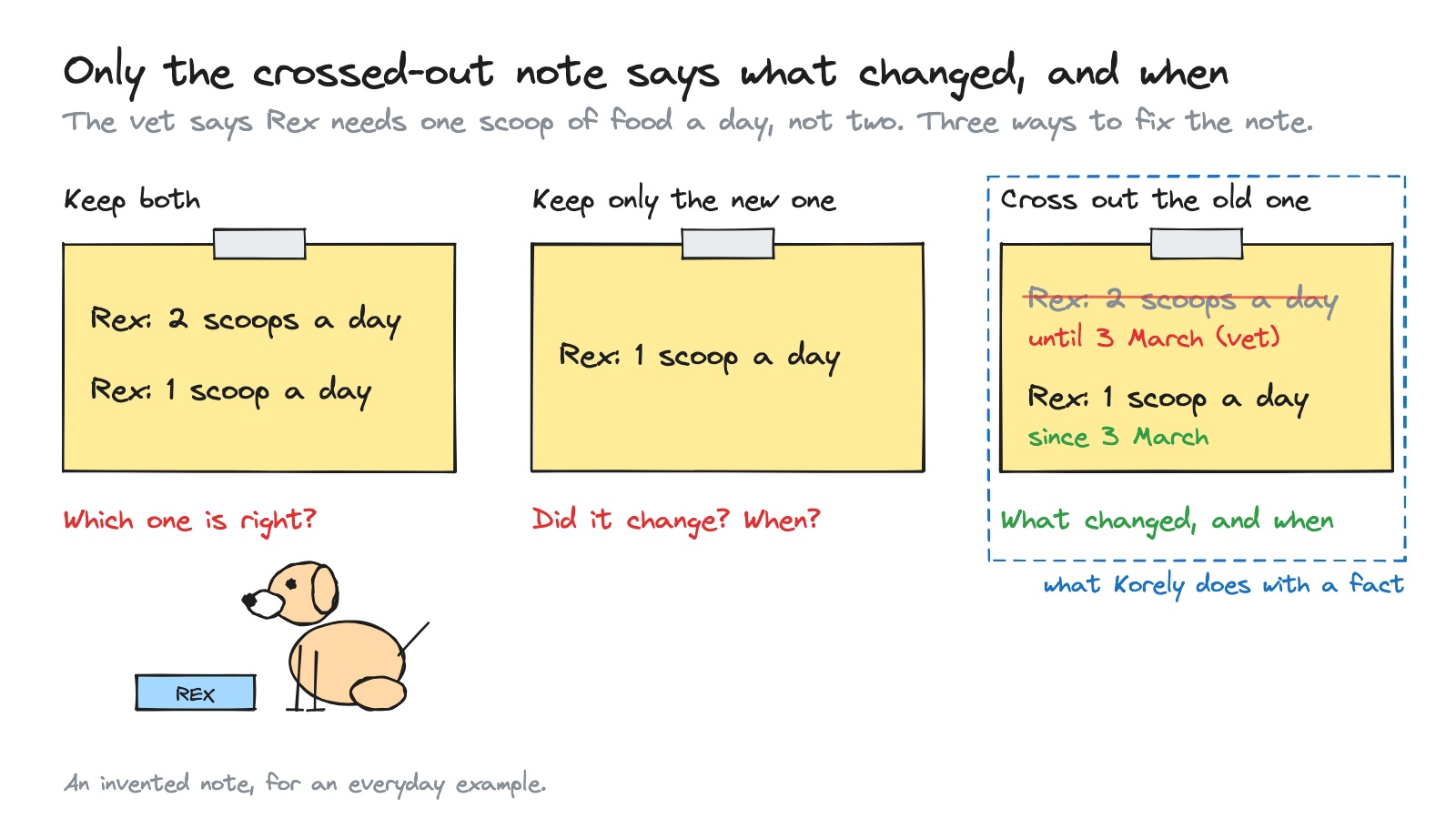
Korely does the third. It reads each memory and writes short facts from it. When Korely's judge, an AI model, decides that a new fact replaces an older one, it closes the old fact with an end date instead of deleting it. A normal read returns only the facts that hold now, and the closed ones are still there to read. A model can be wrong, so for an important decision, ask the assistant to list the facts and correct one if needed. If the judge ever closes a line that still holds, nothing is lost. The old line is still there with its date, and writing it again as a fact makes it true again.
Question 4
How do you leave a memory server?
Sooner or later you'll want to disconnect a tool, or to forget something, and that's a bad moment to start reading the docs. You want one step, not a form, and you want to know what "deleted" really means: gone from reads, or gone from every copy.
Korely: every key is one row on the API keys page of the dashboard. So is every app you connected by signing in, under the app's name. Revoke the row and that key stops working, and for an app that disconnects it. A single memory can be forgotten by its id, from the assistant or the dashboard. With erase=true, the text is removed from the active systems and no longer appears in any read. On Korely Cloud, encrypted backup copies expire within the backup retention period, currently up to 35 days. Revoking a key is changing the lock on one room: the other keys still open their own. And your memories and facts can be read out through the API, and, if you self-host, the data is already on your server.
Details
What Korely gives the assistant: six tools
Two words first, because every tool works with them. A memory is what you save, in your words. A fact is a short line Korely pulls out of it.
A fact looks like "this repo / deploys to / Hetzner" (a repo is the folder that holds a project's code). Facts are joined to the other facts about the same thing, with their dates. People call that a temporal knowledge graph.
Once the server is connected, the assistant sees Korely's tools next to its own. There are six:
| Tool | What it's for |
|---|---|
korely_get_context | Recall. The facts that hold now and the closest memories, as one block of text, before it answers. |
korely_add | Save a decision or a preference once it's settled. Korely writes the facts from it. |
korely_search | Look up the stored memories by meaning, when it wants the original text. |
korely_get_facts | Read the facts, also as they stood on a past date. |
korely_correct_fact | Fix a wrong fact. The old one is closed and a new one is written. |
korely_forget_memory | Forget one memory. With erase=true its text is removed from the active systems. |
The server also sends the assistant a few short instructions, starting with these two: recall before answering, and save once a decision is settled. The assistant decides when to call a tool. The Korely MCP page lists every argument.
Steps
Connect Korely with a key that can only read and write
You need Cursor, Claude Code, Codex or OpenCode, and a browser for the first step. These steps use Korely Cloud. With your own installation, use its address instead of api.korely.ai; the installer prints the line for Claude Code.
1. Get a key without admin. Sign in to the Korely dashboard at agent.korely.ai and make a key on the API keys page, with read and write ticked and admin off, as it comes. What each plan includes is on the pricing page.
2. Add the server to your client. It's one address and your key.
For Claude Code, one command (add --scope user to have it in all your projects on this machine):
claude mcp add --transport http korely https://api.korely.ai/agent/mcp \ --header "Authorization: Bearer kor_live_..."
For Cursor, put this in ~/.cursor/mcp.json, or in .cursor/mcp.json to limit it to one project:
{ "mcpServers": { "korely": { "url": "https://api.korely.ai/agent/mcp", "headers": { "Authorization": "Bearer kor_live_..." } } }}
Keep .cursor/mcp.json out of git. The Cursor page of the docs shows how to keep the key out of the file altogether.
For Codex, export the key and add the server. Launch Codex from the same terminal, because it reads the variable when it connects:
export KORELY_API_KEY=kor_live_...codex mcp add korely \ --url https://api.korely.ai/agent/mcp \ --bearer-token-env-var KORELY_API_KEY
For OpenCode, add the server to opencode.json, in your project or in ~/.config/opencode/:
{ "$schema": "https://opencode.ai/config.json", "mcp": { "korely": { "type": "remote", "url": "https://api.korely.ai/agent/mcp", "headers": { "Authorization": "Bearer kor_live_..." } } }}Antigravity, Hermes Agent and Pi Agent have their own pages: Antigravity, Hermes Agent, Pi Agent.
3. Restart the client if the tools don't show up. In Claude Code, /mcp shows whether korely is connected. In Cursor, manage the server from the Customize page, and if it doesn't connect, the Output panel has MCP Logs.
4. Try it. Tell your client "Remember that this repo deploys to Hetzner", then, in a new session, ask "How do we deploy this?". In the first session you want to see korely_add, and in the second korely_get_context and the answer Hetzner. If it answers without looking, tell it to use the korely tools. To check the key on its own, curl https://api.korely.ai/v1/ping -H "Authorization: Bearer kor_live_..." answers with ok, the plan and the region.
Before you save anything
What to save, and what to keep out
Save each decision with its reason and its date, and keep keys, passwords and other people's data out. The rules my own agents follow are in What should a coding assistant remember?.
To close
What I took home
The six copies taught me that a copy keeps the words of a rule and loses the reason. So write the reason and the date next to each decision. And give your editor a memory that keeps the old line, with its date, when the decision changes.
Make a key on the dashboard, paste it into your editor, and tell it one decision with its reason. Next week, ask it why you made it. My six copies of that file still can't answer.
Read next
The rest of this series
- Cursor in the docs: the JSON, the key outside the file, and the hooks that save each session.
- What should a coding assistant remember?: what goes in, and how to write a memory that still makes sense a month later.
- How to give Claude Code persistent memory: the same memory, step by step, for Claude Code.
FAQ
Questions about Korely's MCP server
Do I need to install anything to use Korely's MCP server?
No. On Korely Cloud it's a remote server at https://api.korely.ai/agent/mcp. You add the address and a key to your client, and the six tools appear. If you run Korely on your own server, you use the address of your installation instead. For a client that only runs local servers, the korely-memory Python package has a small local one, korely-mcp, which sends every call to the same memory with your key.
Can Cursor and Claude Code share one Korely memory?
Yes. Connect both to the remote server with keys of the same project. What you save from one, the other reads. The REST API, the SDKs and the CLI sit on the same store, so an agent you build later can read it too.
Does the key in my editor expire?
Yes. You pick how long a key lasts when you make it on the API keys page, and no key on Korely Cloud lasts more than a year. The page shows the end date. Before that day, press Rotate on the key and paste the new one in your client.
Where is my memory stored?
It depends on how you run Korely. On Korely Cloud, which we manage, it's in Europe, on our server in Helsinki. Data and governance has the details, including which AI model reads the text to write the facts. If you install Korely on a server of your own, from its open-source code on GitHub, the memory stays on that server, and you choose the AI model that writes the facts.
How do I remove what I saved?
Forget one memory by its id with korely_forget_memory, or press Delete on it in the dashboard: it drops out of every read. With erase=true, or the Erase button, the text is removed from the active systems and no longer appears in any read. On Korely Cloud, encrypted backup copies expire within the backup retention period, currently up to 35 days. Revoke the key on the API keys page and nothing more is read or written with it.