

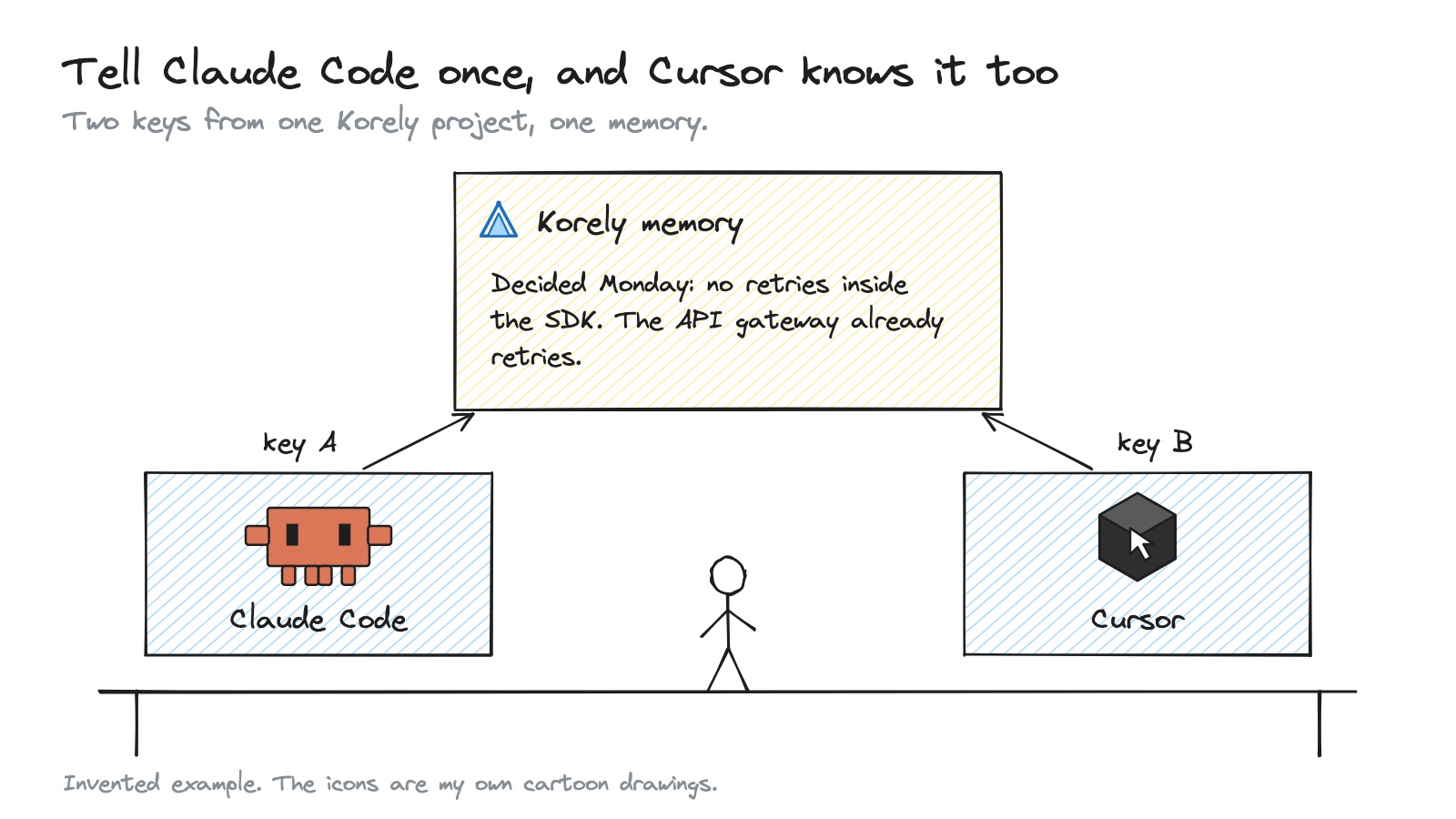
To share one memory between Claude Code and Cursor, connect both to the same Korely project. There are two ways to do it: add Korely's remote MCP server to both editors, or install Korely's hooks in the repository for both. The simplest setup is the same way in both editors, and then each one reads what the other saved.
The story
Why two editors on one repository need one memory
I built Korely because I kept telling every agent the same thing. I had agents in Claude Code for the code, in Hermes, and in Grok, the one I use for posts and for talking in the car, and I wanted one memory for all of them (the longer story is in Shared agent memory). Two editors on one repository have the same problem. Smaller, and more annoying, because they work on the same files.
Say on Monday you tell Claude Code: we decided not to add retries inside the SDK, because the API gateway already handles them. You only say it in the chat, and nobody has written it in the repository yet. On Wednesday you open the same repository in Cursor, and it adds a retry loop to the SDK. Nobody told it. You type the same sentence again, and now you're the memory of two editors.
Way one
Connect both editors to the same Korely project
This is the simple way, and it works on every machine. Korely's memory is a server that AI tools reach through MCP, an open standard both editors speak. The examples use Korely Cloud. If you run Korely on your own server, the open-source installation, the pattern is the same: put the address of your installation where api.korely.ai is.
Start with keys. Make a free account at agent.korely.ai, open the API keys page and make a key for Claude Code and another for Cursor, both in the same project. Each form ticks read and write and leaves admin off, so the key can use the memory but can't manage your account. Keys from the same project read the same memory. Two keys cost you nothing and let you revoke or rotate one editor without cutting off the other. For a quick personal test you can reuse one key in both, but it isn't the setup I'd leave in place. A key lasts 90 days unless you pick another length, and it's shown once, so copy it. Before that day, press Rotate on the key and paste the new one in the editor. The Claude Code post has the longer version.
In Claude Code, one command. Paste the key you made for it in place of kor_live_...:
claude mcp add --transport http korely https://api.korely.ai/agent/mcp \ --header "Authorization: Bearer kor_live_..."
In Cursor, open ~/.cursor/mcp.json and add the same server with the other key:
{ "mcpServers": { "korely": { "url": "https://api.korely.ai/agent/mcp", "headers": { "Authorization": "Bearer kor_live_..." } } }}
Run /mcp in Claude Code to see korely connected. In Cursor the server shows on the Customize page, and if it doesn't connect, the Output panel has the MCP Logs. To keep the key out of the file, write Bearer ${env:KORELY_API_KEY} as the header's value, and export KORELY_API_KEY in the shell that launches Cursor. The file then points to a key kept in your computer's environment. The Cursor page of the docs shows how.
Both editors now talk to one memory. The server asks each of them to read the current facts before answering, and to save a decision once it's settled. Facts are the short statements Korely writes from what you save, like "the SDK / has no / retries". When a later decision replaces an earlier one, Korely's judge, an AI model, can cross out the old fact with a date instead of deleting it. The judge can be wrong, so for an important decision ask the editor to list the facts. Each editor still decides when to call the memory. Make a key for another machine in the same project, and the editor there reads the same memory.
Way two
Let Korely's hooks save every session
Way two takes the choice away from the editors, because Korely's hooks save for them. Hooks are small scripts an editor runs at set moments: when a session starts, after each answer, before a compact (when a long chat gets squeezed into a short summary). You need Python. In the repository, install the package and run the two korely init commands, the first with a key from the dashboard:
pip install -U korely-memorykorely init --tool claude-code --api-key kor_live_...korely init --tool cursor
The first korely init saves the key on your machine, so the second only installs, and both editors on that machine use that one key. Then restart Claude Code, so it loads the hooks. Both editors now share one memory for this repository. It's named after the folder, repo:<name>, so a folder called app gets repo:app.
When a session starts, the hooks hand the editor what the memory holds for the repository. Every few answers, before a compact and at the end, they send the conversation to the memory. Each piece opens with a line that names the repository, the editor and the day. The memory belongs to the repository. Decide something in another repository and it lives in that one's memory.
korely init --toolalso adds a local memory server namedkorelyfor this repository, replacing any server calledkorelythere. It has fewer tools than the remote one, and it can't correct or forget a single fact or memory.- The hooks send the conversation to your memory, on Korely Cloud, or on your own server if you run Korely yourself and give
korely initits--base-url. Before anything leaves your machine, they blank out what looks like a key. That is best effort, not a guarantee: they go by shape, so a short password typed in a sentence stays as plain text. Keep secrets out of the chat.
The trap
Why I keep both editors on the same way
Mixing the two ways isn't forbidden. It's the one setup that surprises people. Say Claude Code uses the remote server from way one, and Cursor uses the hooks from way two. It looks fine for a day.
Claude Code saves through the remote server. Its note goes to repo:app only if it passes that name as the user_id, the name a memory is filed under. Otherwise it lands outside repo:app, for example in the memory with no name, the tray in the drawing below. Cursor's local server reads only repo:app. Claude Code reads everything the key can see, so it finds Cursor's sessions. Cursor doesn't find Claude Code's notes. The memory works in one direction, and you only notice when Cursor adds the retry loop you decided against.
The two ways can talk to each other: if the remote server writes to the same user_id, repo:app, both editors see everything. What goes wrong is mixing them without lining up that name.
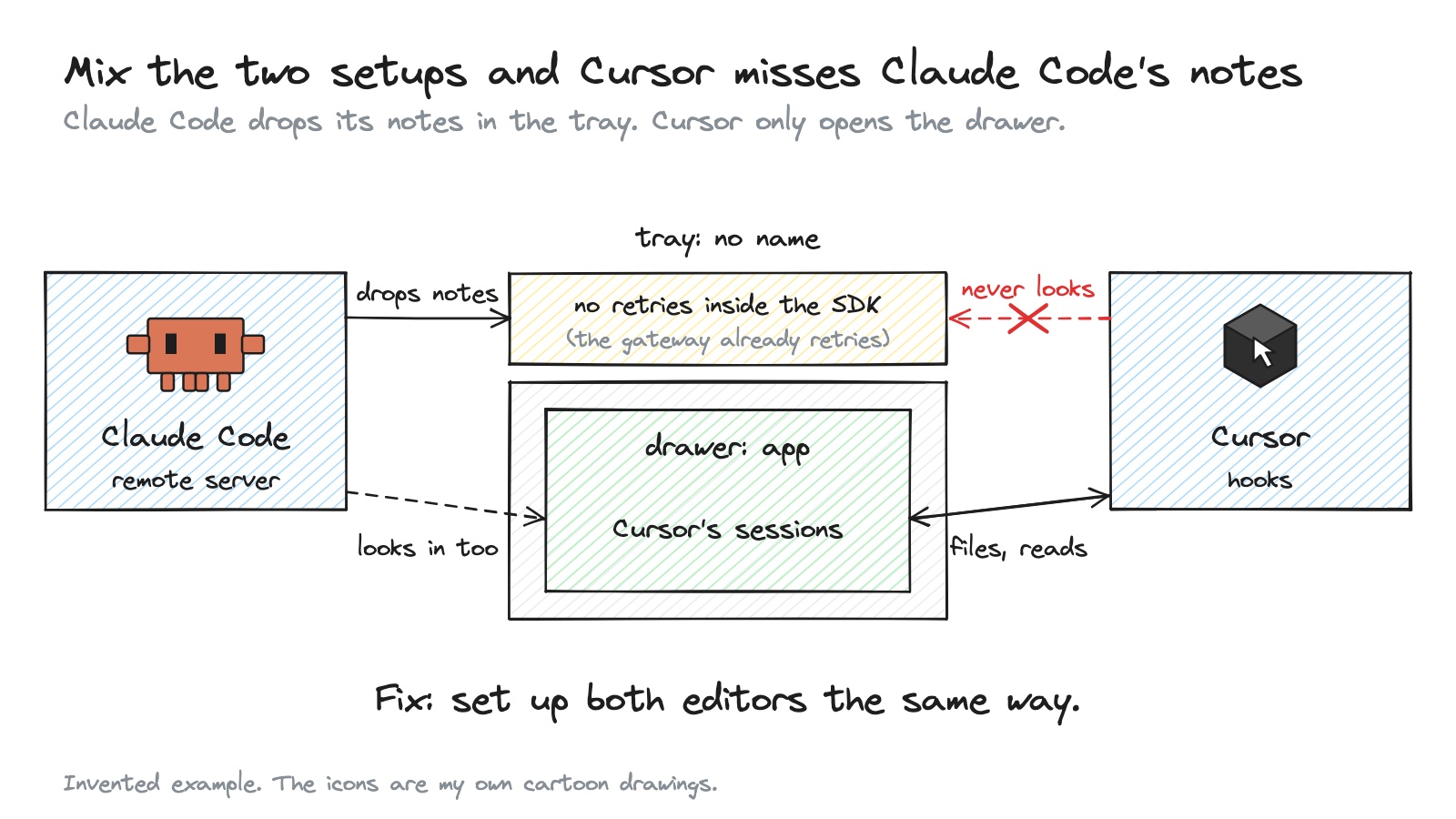
So the simplest and safest setup is the same way in both editors, like I said at the top.
Conclusions
What to take home
- Connect both editors to the same Korely project. On the remote server, give each editor its own key, so you can revoke one without the other. The hooks use the one key saved on the machine. Keys from the same project read the same memory.
- Put stable rules and commands (how to run the tests, where things live) in the repository, in
CLAUDE.mdorAGENTS.md, where both editors already read them. Put decisions, their reasons and preferences from your conversations in the shared memory. - The simplest default is the same way in both editors: the remote server if you work on more than one machine, the hooks if you want every session saved. When one editor misses what the other saved, check that first.
Make a free key at agent.korely.ai. Then tell Claude Code on Monday one decision and its reason, and on Wednesday open the repository in Cursor and ask. If it answers with the reason, that's one Wednesday you weren't the memory of two editors.
Read next
More on memory for Claude Code
- How to give Claude Code persistent memory: the setup in detail, and what the memory does when a decision changes.
- The docs pages for Claude Code, Cursor and the hooks.
FAQ
Questions about Korely, Claude Code and Cursor
Can Claude Code and Cursor share one memory?
Yes. Connect both to the same Korely project, either through Korely's remote MCP server, with a key for each editor, or through the hooks that korely init --tool installs in a repository, which use the one key saved on that machine. Keys from the same project read the same memory. The simplest and safest setup is the same way in both editors.
Which of the two ways should I pick?
The remote server if you want one memory on every machine and in every assistant, with nothing to install. The hooks if you want every session saved for you, in one memory per repository. Then set up both editors the same way.
Why does one editor miss what the other one saved?
Usually because the two editors are set up in different ways. A note saved through the remote server goes to the repository's memory, repo:<name>, only if the editor passes that name as the user_id. The local server that korely init --tool installs reads only repo:<name>. So the editor on the hooks misses the other one's notes. The two ways can talk, if the remote server writes to the same user_id, but the easiest fix is to set up both editors the same way.
Does it work with Codex too?
Yes. A key from the same project works in Codex through the remote server, and korely init --tool codex installs the hooks for it; trust them once in Codex's /hooks.
Can I do this with Korely on my own server?
Yes. The examples use Korely Cloud, but Korely is open source: install it on your own infrastructure and put the address of your installation where api.korely.ai is. The keys of an installation of your own begin with kor_self_.